
1 / 6
Premium Interactive Tool$9.99 $4.99 Sale
Advanced Planning Timeline
Build a detailed milestone timeline from planning day through celebration day.
✓ Secure checkout✓ Tutorial included
What you get
- Celebration-date-based advanced planning timeline
- Recommended planning tasks organized by planning phase
- Editable task dates, categories, priorities, statuses and assignments
- Add custom planning tasks
- Task dependencies with “Waiting on” relationships
- Recommended timing guidance for planning tasks
- “Why this matters” guidance for key planning decisions
- Prerequisite checklists for detailed task preparation
- Dynamic Task Notes with expandable numbered lines
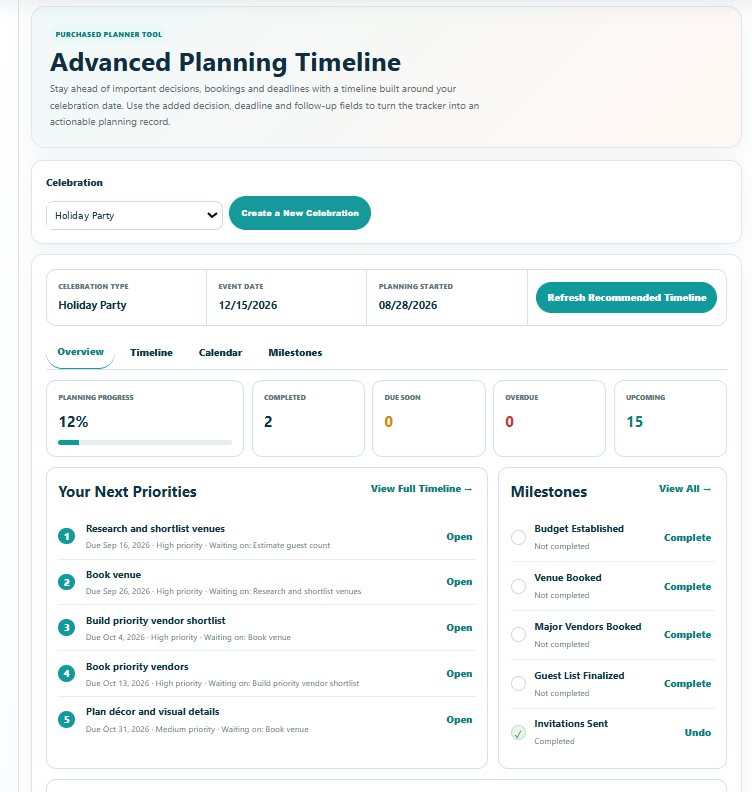
- Overview with planning progress, completed, due soon, overdue and upcoming tracking
- Prioritized “Your Next Priorities” planning view
- Planning Milestones with completion tracking
- Dynamic Timeline Notes with expandable numbered lines
- Date-ordered Calendar view of active timeline tasks
- Create a new celebration directly from the tool
- Save planning progress with your celebration
- Professional branded PDF with full planning timeline, task details, milestones, notes and Calendar
- Device-responsive Print / Save PDF preview
Quick Tutorial
How it works
A short guide to using this tool.
- Select an existing celebration or create a new celebration directly from the Advanced Planning Timeline.
- Review the recommended timeline built around your celebration date, including your next priorities and major planning milestones.
- Open Timeline to review tasks, adjust planning details, add custom tasks, update statuses, complete prerequisite steps and add Task Notes.
- Use Milestones to track major readiness points and add Timeline Notes as your plans develop.
- Use Calendar to review your active dated tasks in chronological order while keeping their planning-phase context.
- Keep your Timeline updated as plans change so your Overview, Milestones and Calendar reflect your current planning progress.
- Save Progress so the tracker is available from Planner Dashboard -> Saved Progress, then use Print / Save PDF when you want a complete branded planning record, including the detailed timeline, milestones, notes and date-ordered Calendar.