
1 / 7
Premium Interactive Tool$7.99 $3.99 Sale
Contract & Deadline Tracker
Track contract dates, deposits, cancellation windows, balances and critical deadlines.
✓ Secure checkout✓ Tutorial included
What you get
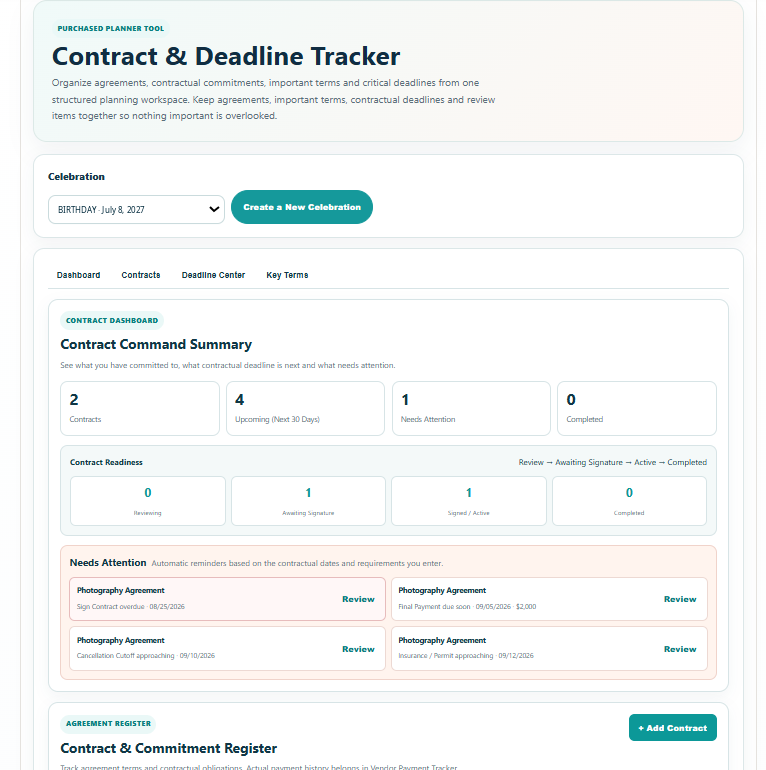
- Contract Command Summary with total contracts, upcoming contractual deadlines, contracts needing attention and completed agreements at a glance
- Contract Readiness view across Reviewing, Awaiting Signature, Signed / Active and Completed stages
- Automatic Needs Attention alerts for overdue deadlines, approaching final payments, cancellation or change cutoffs, signature deadlines, missing critical dates and insurance / permit requirements
- Contract & Commitment Register for agreement name, provider, category, status, contract date, contract value, required deposit or retainer, final balance due and final payment deadline
- Important Terms reference for cancellation, postponement / rescheduling, refund / deposit, overtime / additional fees, minimums, insurance / permits, setup / delivery and other important contract terms
- Unlimited Deadline Builder with built-in contractual deadline types plus a Custom deadline option
- Contract Review Checklist covering parties, services, pricing, deposits, payment schedule, cancellation and change terms, fees, minimums, setup / delivery, insurance / permits, important dates and signed-copy retention
- Search plus status and category filters, including planner-defined Custom categories
- Saved Contract Register sorting by deadline, recently added, contract name, provider, contract value or status
- Chronological Deadline Center with All, Next 30 Days, Needs Attention and Completed views independent of the Contract Register sort
- Key Terms at a Glance for cancellation / change cutoffs, final payments, guest / quantity deadlines and insurance / permit requirements with the next relevant date
- Save Progress connected to the selected celebration so contracts, terms, deadlines, checklist progress, notes, custom values and sort choice remain available later
- Branded Print / Save PDF Contract & Deadline Report with Celebration Details, Contract Command Summary, Contract Overview, Needs Attention, chronological Deadline Action Schedule, Key Terms at a Glance and detailed Contract Reference pages
Quick Tutorial
How it works
A short guide to using this tool.
- Select the saved celebration you want to manage so its agreements, important terms, contractual deadlines and review progress stay together.
- Review the Contract Dashboard to see total contracts, upcoming deadlines, Needs Attention items and Contract Readiness across Reviewing, Awaiting Signature, Signed / Active and Completed.
- Open Contracts and add each agreement. Record the contract or agreement name, provider, category, status, contract date and reference or contact information.
- Record the financial commitment stated by the agreement, including contract value, required deposit or retainer, final balance due and final payment deadline. Use this section as contract reference information rather than a payment ledger.
- Capture Important Terms such as cancellation, postponement or rescheduling, refund or deposit terms, additional fees, minimums, insurance or permit requirements and setup or delivery requirements.
- Build the agreement's Important Dates & Deadlines. Choose a built-in contractual deadline type or Custom, then add the due date, optional amount, status and planning note. Add as many deadlines as the agreement requires.
- Work through the Contract Review Checklist and add a Planning Note so important review items, open questions and follow-up details stay with the agreement.
- Search, filter by status or category and choose the Contract Register sort order you want. Use Deadline Center for the chronological action view and Key Terms for the next high-impact contractual dates.
- Choose Save Progress to preserve the selected celebration's contracts, custom categories and deadlines, important terms, checklist progress, planning notes and saved Register sort choice.
- Use Print / Save PDF to open the branded Contract & Deadline Report preview, then print or download the complete planning record with the Command Summary, Contract Overview, Needs Attention, chronological Deadline Action Schedule, Key Terms and detailed Contract Reference pages.