
1 / 6
Premium Interactive Tool$5.99 $2.99 Sale
Decor & Rental Planner
Track décor and rental items, quantities, locations, vendors, costs and returns.
✓ Secure checkout✓ Tutorial included
What you get
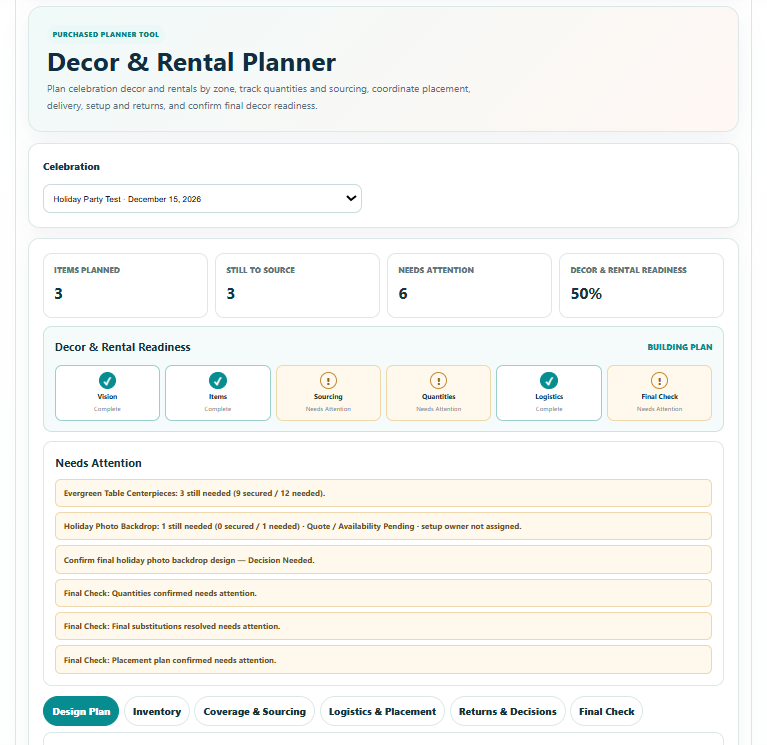
- Decor & Rental Command Summary with Items Planned, Still to Source, Needs Attention and overall Decor & Rental Readiness
- Six-stage readiness view covering Vision, Items, Sourcing, Quantities, Logistics and Final Check
- Celebration Design Plan for style, indoor/outdoor setting, color palettes, primary provider and venue/location notes
- Design Priorities and reusable Celebration Zones for organizing the visual plan
- Structured Decor & Rental Inventory with quantity needed, quantity secured, source method, provider, sourcing status, placement, setup owner, after-celebration destination and notes
- Automatic Secured, Partially Secured and Not Secured quantity status plus Quantity & Coverage review
- Sourcing Board that keeps secured items visible while highlighting items that still need sourcing or follow-up
- Delivery, Setup & Pickup Plan with dates, AM/PM times, receiving person, setup/breakdown responsibility, pickup/return details and status
- Automatic Setup & Placement Plan organized from Inventory by celebration zone
- Rental & Borrowed Item Return Tracker with logistics-derived pickup information where applicable
- Decor & Rental Decisions tracker with zone, owner, due date, status and planning note
- Final Decor & Rental Check with Confirmed, Needs Attention and Not Applicable statuses
- Save Progress connected to the selected celebration
- Branded multipage Print / Save PDF report with Command Summary, Needs Attention, design plan, inventory, coverage/sourcing, logistics, placement, returns, decisions and Final Check
Quick Tutorial
How it works
A practical step-by-step guide to using this tool.
- Select the celebration, or create one first. In the Celebration Design Plan, define the style, indoor/outdoor setting, palette, primary provider and venue notes.
- Add Design Priorities and Celebration Zones so the plan reflects the areas you actually need to decorate. Use these zones consistently when assigning inventory and setup locations.
- Add each item to the Decor & Rental Inventory with quantity needed, quantity secured, source method, provider, placement, setup owner, after-celebration destination and notes.
- Review Quantity & Coverage to identify Not Secured or Partially Secured items. Update quantity secured only when you have a confirmed purchase, rental, borrowing arrangement or other source.
- Use the Sourcing Board to work through missing items and follow-up. Keep provider and sourcing status current as choices are confirmed, and revisit the inventory if the design or required quantities change.
- Complete Delivery, Setup & Pickup Plan with dates, AM/PM times, receiving person, setup and breakdown responsibilities, return details and status. Confirm arrangements with the actual provider or item owner.
- Review the automatically organized Setup & Placement Plan by celebration zone. Check that every item has a useful placement and a named setup owner.
- Use the Rental & Borrowed Item Return Tracker to confirm where items go after the celebration, who returns them and the pickup or return arrangements. Check logistics-derived information against the agreed arrangements.
- Record unresolved Decor & Rental Decisions with zone, owner, due date, status and planning note. Review Needs Attention and the six readiness stages to find sourcing, quantity or logistics gaps.
- Work through Final Check and mark each item Confirmed, Needs Attention or Not Applicable based on the actual plan. Resolve remaining gaps before treating the decor and rental plan as ready.
- Click Save Progress and use Print / Save PDF to produce the current report. Review inventory, logistics, placement and returns with the responsible people, then update and export again when the plan changes.