
1 / 8
Premium Interactive Tool$5.99 $2.99 Sale
Invitation & Communication Manager
Track invitation status, response deadlines, reminders and guest communications.
✓ Secure checkout✓ Tutorial included
What you get
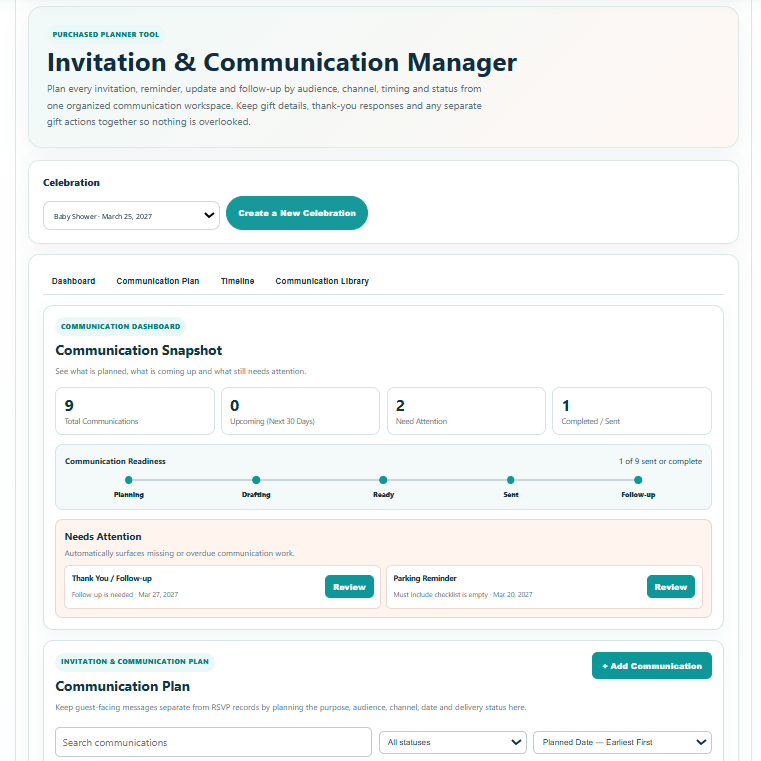
- Communication Snapshot with total communications, upcoming work, Needs Attention and sent / complete status at a glance
- Communication Readiness view that shows planning progress across Planning, Drafting, Ready, Sent and Follow-up stages
- Automatic Needs Attention cards for overdue work, follow-up items and incomplete communication details
- Structured Communication Plan for communication type, audience, channel, planned / sent date, status and attention indicators
- Built-in communication types for Save the Date, Invitation, RSVP Reminder, Event Details / Final Information, Venue / Location Update, Travel / Lodging, Dress / Attire and Thank You / Follow-up
- Custom Communication option with a planner-defined communication name for anything not covered by the built-in types
- Message Builder with Purpose, Must Include checklist, Message Draft, Call to Action and Planning Note fields
- Communication Library for quickly starting common guest-facing messages while keeping each saved communication fully editable
- Search, status filtering and saved sorting for reviewing the Communication Plan in the order most useful to the planner
- Chronological Communication Timeline that remains date-ordered independently of the Communication Plan sort choice
- Save Progress connected to the selected celebration so communications, custom types, notes, dates, statuses and sort choice remain available later
- Branded Print / Save PDF report with Celebration Details, Communication Command Summary, Communication Plan, Needs Attention, chronological Timeline & Action Schedule, Message Reference, Next Step guidance and final planning note
Quick Tutorial
How it works
A short guide to using this tool.
- Select the saved celebration you want to manage so every communication, date, status and message draft stays connected to the correct event.
- Review the Communication Dashboard to see the total plan, upcoming communications, Needs Attention items and overall Communication Readiness at a glance.
- Open Communication Plan to add a communication from the built-in types or choose Custom and enter your own communication type. Set the audience, channel, planned or sent date and workflow status.
- Use the Message Builder to define the purpose, check the details that must be included, write or refine the message draft, choose the intended Call to Action and add a planning note when useful.
- Use the Communication Library as a starting point for common messages such as Save the Date, Invitation, RSVP Reminder, Event Details, Venue / Location Update, Travel / Lodging, Dress / Attire and Thank You / Follow-up. Every draft remains editable before it is saved.
- Search, filter by status and choose the Communication Plan sort order you want. Review Needs Attention for overdue, follow-up or incomplete items that require action.
- Open Timeline for the complete chronological communication schedule. Timeline stays ordered by date even when the Communication Plan is sorted another way.
- Choose Save Progress to preserve the selected celebration's communications, custom communication names, message content, dates, statuses, planning notes and saved sort choice.
- Use Print / Save PDF to open the branded report preview, then print or download the complete planning record with Celebration Details, Command Summary, Communication Plan, Needs Attention, Timeline & Action Schedule and Message Reference.