
1 / 6
Premium Interactive Tool$4.99 $1.99 Sale
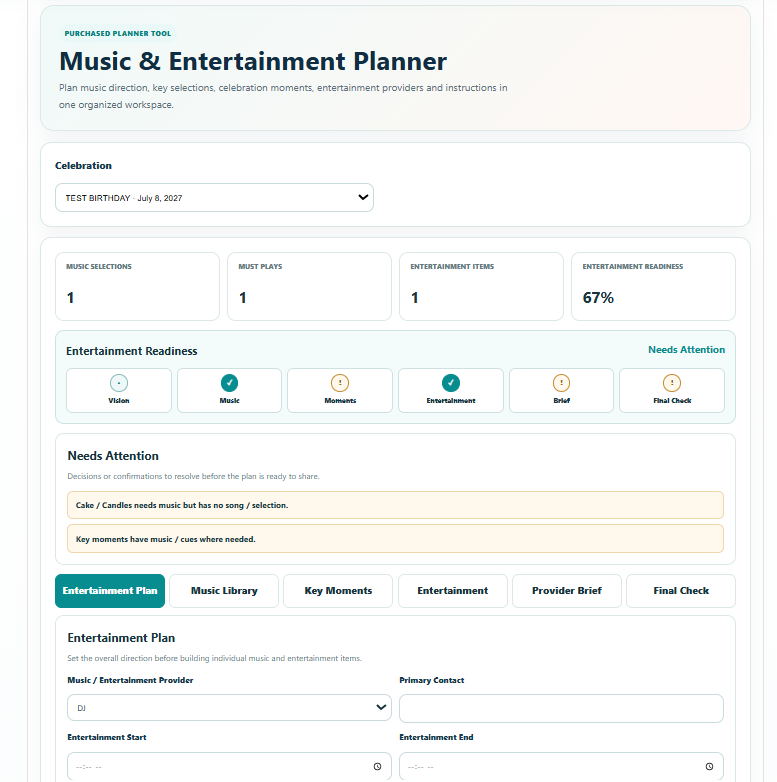
Music & Entertainment Planner
Organize music, must-play and do-not-play lists, entertainment notes and timing.
✓ Secure checkout✓ Tutorial included
What you get
- Entertainment Plan for music / entertainment provider, primary contact, performance window, atmosphere, languages / cultural music, preferred genres / styles, preferred eras / decades, audience considerations, entertainment goals and venue / sound restrictions
- Music Library for Must Play, Optional and Do Not Play selections with song / selection, artist / version, moment / use, genre / style, requested by / for and planning notes
- Key Moments planner with celebration-aware moments, phase, music requirement, connected song / selection, people involved, provider notes and readiness status
- Entertainment Lineup for activities and performers with type, provider / contact, phase, location / zone, duration, participants, special requirements and readiness status
- Provider Brief that consolidates provider details, performance window, Must Play selections, key music moments and entertainment lineup for handoff
- Entertainment Readiness stages, Command Summary and automatic Needs Attention alerts
- Final Check with Confirmed, Needs Attention and Not Applicable statuses for provider, timing, music selections, key moments, announcements, names / pronunciations, cultural requirements, entertainment, equipment, venue restrictions and final sharing
- Save Progress connected to the selected celebration
- Professional branded multi-page Print / Save PDF Music & Entertainment Report with Command Summary, Needs Attention, Entertainment Plan, Music Selections, Key Moments, Entertainment Lineup, Provider Brief, Final Check and next step
Quick Tutorial
How it works
A practical step-by-step guide to using this tool.
- Select the celebration, or create one first. In Entertainment Plan, record the provider, primary contact, performance window, atmosphere, languages or cultural music, preferred styles and eras, audience considerations, goals and venue restrictions.
- Build the Music Library using Must Play, Optional and Do Not Play. Record the song or selection, artist and version, intended moment or use, genre, requested by or for and any planning notes.
- Use Key Moments to add the moments you actually want. Set the celebration phase, whether music is needed, the connected song or selection, people involved, provider notes and readiness status.
- Confirm the exact version and intended use of important selections with the provider. Resolve missing music, special requirements or instructions before marking a key moment ready.
- Build the Entertainment Lineup for activities and performers. Include type, provider/contact, phase, location, duration, participants, special requirements and readiness status.
- Review the Provider Brief, which brings together provider details, performance window, Must Play selections, key music moments and the entertainment lineup. Check the instructions with the DJ, MC, band or other responsible provider.
- Review Entertainment Readiness and Needs Attention for incomplete selections, moments or performer details. Update the relevant entries when arrangements are confirmed.
- Complete Final Check for provider and timing, music, announcements, names and pronunciations, cultural requirements, equipment, venue restrictions and final sharing. Use Confirmed, Needs Attention or Not Applicable honestly.
- Click Save Progress to retain the current plan for the selected celebration. Reopen the same celebration when making further music or entertainment changes.
- Use Print / Save PDF to produce the Music & Entertainment Report. Share it with the responsible providers and coordinator, confirm the agreed instructions and issue a fresh report after revisions.