
1 / 6
Premium Interactive Tool$4.99 $1.99 Sale
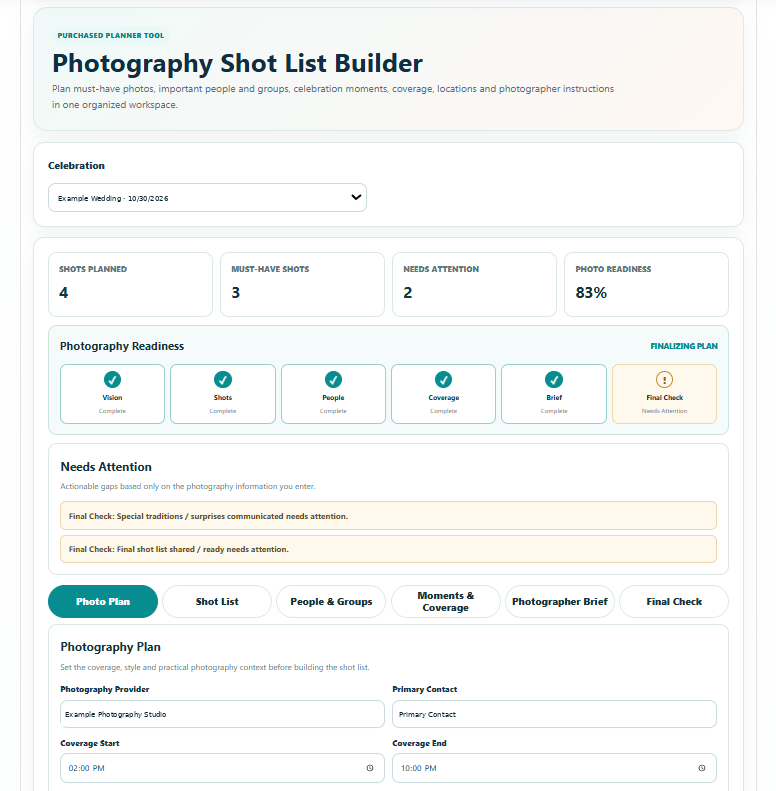
Photography Shot List Builder
Build a custom must-have photography list for people, details and celebration moments.
✓ Secure checkout✓ Tutorial included
What you get
- Photography Plan for provider, primary contact, coverage start and end times, photography style, primary photo goals and venue / photography notes
- Photo Priorities with Must Have and High importance levels plus reusable Custom priority areas
- Photo Locations / Zones for reusable photography locations and location-specific notes
- Shot List Builder with category, priority, phase, location, people, timing / moment cue, coordinator, photographer notes and status for each shot
- People & Groups workspace with Group Photo Builder, group-photo order, people / roles, priority, timing, location, coordinator, notes and status
- Moments & Coverage view that organizes planned photography by celebration phase and surfaces must-have coverage
- Important People & Recognition Notes for family members, VIPs, speakers and other people the photographer should recognize
- Photographer Brief that consolidates provider, coverage, style, goals, venue notes, priorities, locations and important-person instructions
- Photography Readiness stages, Command Summary and automatic Needs Attention alerts
- Final Check for coverage times, photographer contact, must-have shots, important people, group combinations, coordinators, key moments, locations, venue restrictions, special traditions, photographer notes and final shot-list sharing
- Save Progress connected to the selected celebration
- Professional branded multi-page Print / Save PDF Photography Report with Command Summary, Needs Attention, Photo Plan, Shot List, People & Groups, Moments & Coverage, Photographer Brief, Final Check and next step
Quick Tutorial
How it works
A practical step-by-step guide to using this tool.
- Select the celebration, or create one first. In Photography Plan, enter the provider, primary contact, coverage start and end times, photography style, goals and venue or photography notes.
- Set Photo Priorities using Must Have or High importance, and add Custom priority areas when needed. Define what matters most before building a long list of individual shots.
- Add Photo Locations / Zones with location-specific notes. Record access, restrictions or practical details the photographer needs when using each place.
- In Shot List Builder, add each requested shot with category, priority, celebration phase, location, people, timing or moment cue, coordinator, photographer notes and planning status.
- In People & Groups, build the group-photo combinations and set their order. Include people or roles, priority, timing, location and a coordinator who can help gather the group.
- Add Important People & Recognition Notes so the photographer can identify family members, VIPs, speakers and other people who need particular attention.
- Review Moments & Coverage by celebration phase. Check that must-have requests fit within the booked coverage and that timing, people, locations and coordinators are realistic.
- Review the consolidated Photographer Brief. Check contact details, coverage, style, goals, priorities, locations and important-person instructions, then discuss any unresolved requests or restrictions with the photographer.
- Use Photography Readiness and Needs Attention to resolve missing details. Work through Final Check for coverage, people, groups, key moments, locations, venue restrictions, chosen traditions, photographer notes and sharing the final list.
- Click Save Progress after revisions. Use Print / Save PDF to share the Photography Report with the photographer and relevant coordinator; confirm they have the current version and export again if the plan changes.