
1 / 4
Premium Interactive Tool$7.99 $3.99 Sale
Vendor Payment Tracker
Track deposits, balances, due dates and payment notes across your vendors.
✓ Secure checkout✓ Tutorial included
What you get
- Celebration-specific Vendor Payment Tracker workspace with Create a New Celebration access
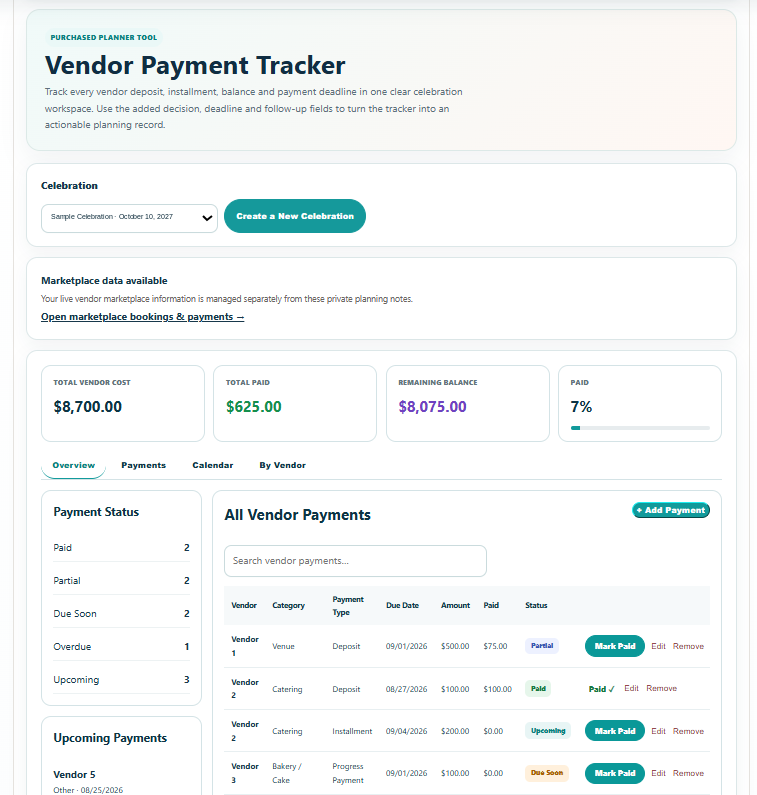
- Live summary of Total Vendor Cost, Total Paid, Remaining Balance and Paid %
- Vendor-level contract totals with Paid, Remaining, Next Payment and Unscheduled Balance visibility
- Smart Vendor Name autocomplete that recalls saved vendors for the selected celebration and auto-fills category and contract total
- Unlimited vendor payment records for deposits, installments, progress payments, final payments, tips / gratuity and other payments
- Automatic payment statuses: Paid, Partial, Due Soon, Overdue and Upcoming
- Overview dashboard with Payment Status, Upcoming Payments, Budget vs. Actual and Payments by Category
- Universal search across vendor, category, payment type, amount, status, dates, method, reference number and notes
- One-click Mark Paid workflow with amount, paid date, payment method, confirmation / reference and notes
- Payment Schedule with edit and remove controls
- Calendar view organized by payment due date
- By Vendor balance summary with contracted amount, paid amount, remaining balance, next payment and unscheduled-balance warnings
- Add Payment shortcut from unscheduled-balance warnings
- Save Progress to Planner Dashboard -> Saved Progress
- Professional branded PDF with payment summary, Upcoming Payments table, complete payment schedule, vendor balance summary, unscheduled-balance warnings and payment records / notes
- Device-responsive Print / Save PDF preview
Quick Tutorial
How it works
A short guide to using this tool.
- Select your celebration or create a new celebration directly from the Vendor Payment Tracker.
- Add a vendor payment. Enter the vendor name, vendor category and vendor contract total, then choose the payment type, amount, due date and any payment details you already have.
- For a vendor already used in this celebration, type a few letters of the vendor name and select the saved vendor; the category and contract total fill automatically and remain editable.
- Build the full payment schedule by adding deposits, installments, progress payments, final balances, tips or other payments for each vendor.
- Use the automatic Paid, Partial, Due Soon, Overdue and Upcoming statuses, or choose Mark Paid to quickly record the amount paid, payment date, method, confirmation / reference number and notes.
- Review Overview, Calendar and By Vendor to monitor total vendor cost, total paid, remaining balance, upcoming obligations, each vendor's next payment and any contract balance that has not yet been scheduled.
- Use Search vendor payments to find records by vendor, category, payment type, amount, status, dates, payment method, reference number or notes; edit or remove payment records as needed.
- Save Progress so the tracker is available from Planner Dashboard -> Saved Progress, or open the branded PDF preview to print or save the payment summary, complete schedule, vendor balances and payment records.