
1 / 5
Premium Interactive Tool$9.99 $4.99 Sale
Vendor Comparison Center
Compare vendor offers, deposits, inclusions and decision notes side by side.
✓ Secure checkout✓ Tutorial included
What you get
- Separate category-based comparison workspaces so Catering, Photography, Venues and other vendor comparisons stay saved independently
- Side-by-side comparison cards for multiple vendors, arranged in easy-to-scan groups of three
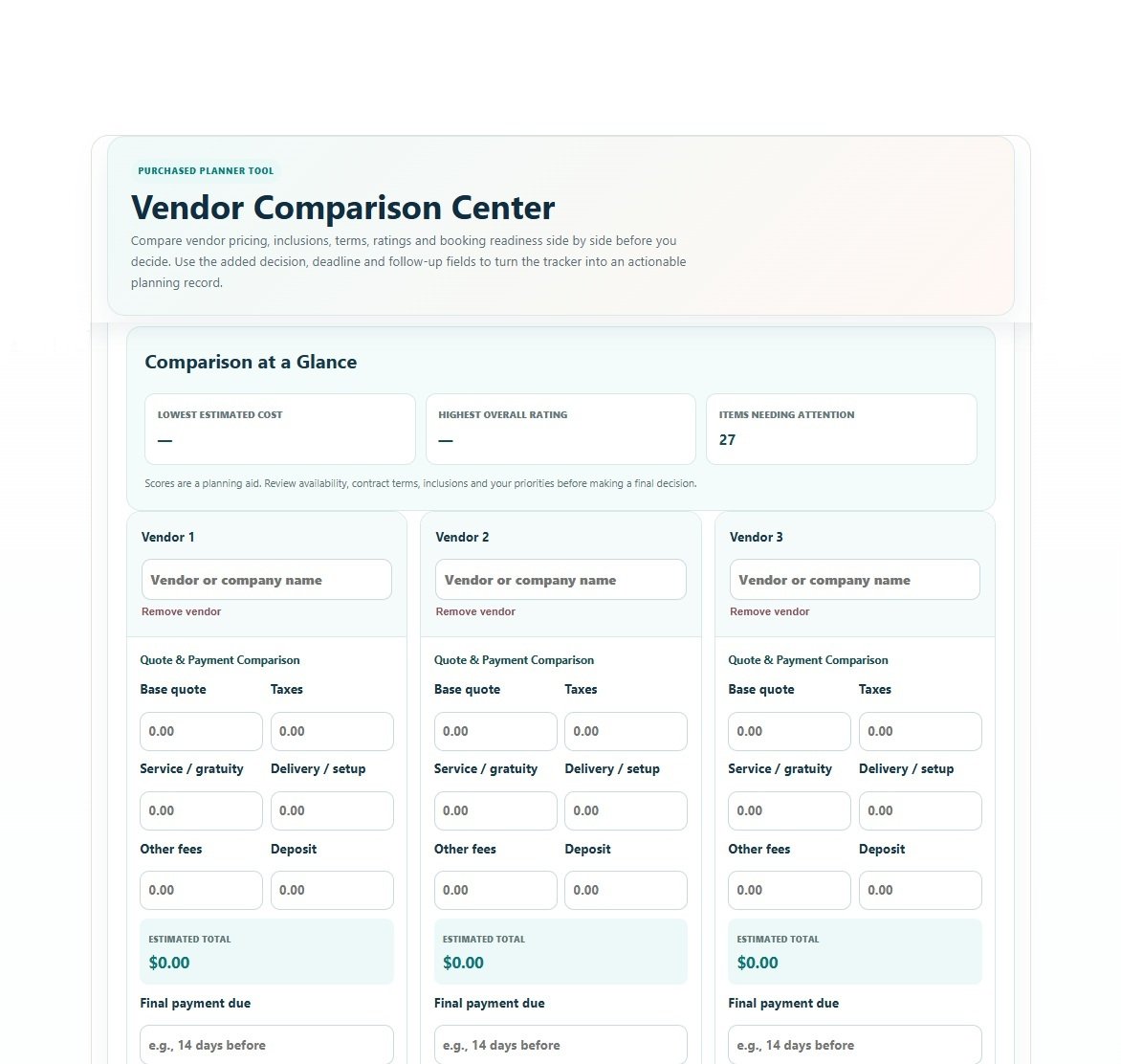
- Full Quote & Payment Comparison: base quote, taxes, service / gratuity, delivery / setup, other fees, deposit, estimated total and final payment timing
- What’s Included checklist with custom comparison items
- Five-part vendor evaluation scoring for value, quality / portfolio, communication, responsiveness and experience / reviews
- Contract & Booking readiness checklist with availability, written quote, contract terms, insurance, backup plan, overtime and fee confirmation
- Comparison at a Glance showing lowest estimated cost, highest overall rating and items needing attention
- Dynamic Pros, Concerns / Red Flags, and Questions / Follow-Up notes with expandable numbered lines
- Preferred vendor and decision-status tracking with expandable decision notes
- Add or remove vendors as your shortlist changes
- Vendor categories use the categories already defined by My Celebration Plan
- Save Progress without overwriting other category comparisons for the same celebration
- Professional branded PDF with vendors 1–3 side by side, then 4–6, 7–9 and additional groups on following comparison pages
- PDF includes detailed financials, inclusions, Contract & Booking status, vendor notes and the final preferred-vendor decision
- Device-responsive Print / Save PDF preview
Quick Tutorial
How it works
A short guide to using this tool.
- Select your celebration, then open an existing vendor-category comparison or create a new comparison using a My Celebration Plan vendor category.
- Add the vendors you want to compare. Enter each quote, taxes, service or gratuity, delivery or setup, other fees, deposit and final-payment timing; estimated totals update the comparison.
- Mark what each vendor includes, score the evaluation criteria, and complete the Contract & Booking checks so price, quality and booking readiness can be reviewed together.
- Record Pros, Concerns / Red Flags, and Questions / Follow-Up for each vendor using the expandable numbered-note sections.
- Review Comparison at a Glance, choose a preferred vendor, set the decision status and record why that vendor is the best fit.
- Save Progress to keep each vendor category as its own comparison for the selected celebration, or open the branded PDF preview to print or save the currently selected comparison.