
1 / 14
Premium Interactive Tool$5.99 $2.99 Sale
Vendor Research Manager
Build a vendor shortlist with contact details, research notes, status and follow-up.
✓ Secure checkout✓ Tutorial included
What you get
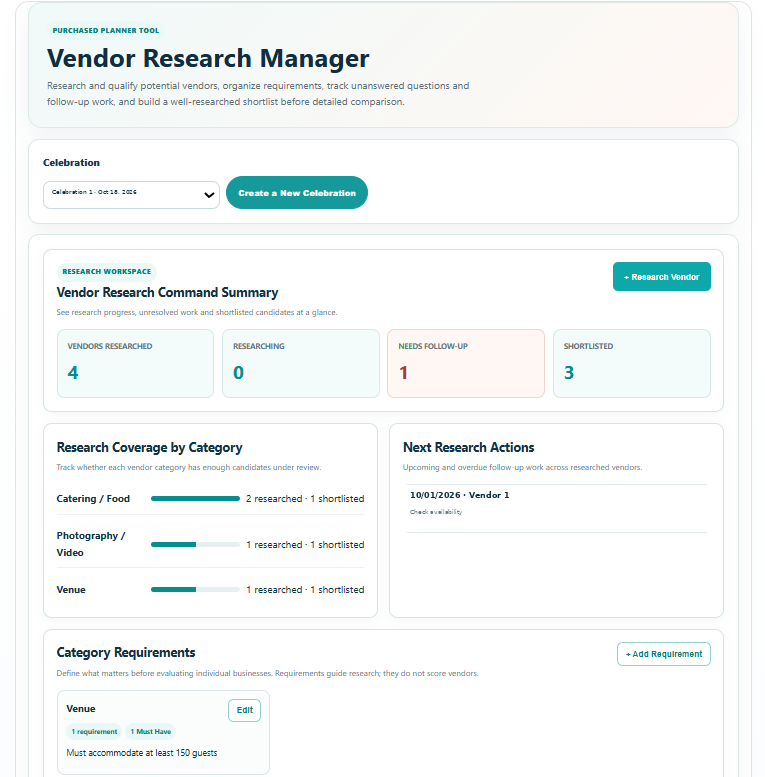
- Vendor Research Command Summary with researched, researching, Needs Follow-Up and shortlisted counts at a glance
- Research Coverage by Category showing how many vendors have been researched and shortlisted against each planning category
- Next Research Actions view for upcoming vendor follow-up work, target dates and action notes
- Category Requirements builder with unlimited requirements and Must Have, Preferred or Nice to Have priority levels
- Vendor Research Register with search, status, category and follow-up filters plus saved sorting by recent updates, next action, vendor name, readiness or status
- Research Pipeline statuses for Idea, Researching, Ready to Contact, Contacted, Shortlisted and Passed candidates
- Vendor Snapshot for business name, category, website, phone, email, location / service area, research source, date researched and business notes
- Initial Fit Check for location, celebration type, availability, budget range, expected scale, required services and verified contact information
- Research Findings for services and specialties, preliminary pricing, availability, service area / travel, capacity, portfolio / experience, policies, accessibility and other findings
- 13-point Research Checklist covering website, services, portfolio, pricing, availability, service area, capacity, reputation, contact information, policies, credentials, accessibility and prepared questions
- Reputation & Verification section for sources reviewed, research impression, repeated positive themes, repeated concerns, credentials / insurance / licensing to verify and verification notes
- Unlimited Questions to Ask with question category, Must Ask / Important / Optional priority, Need to Ask / Answered / Not Applicable status and answer or finding
- Sources & Research Notes for source or link, finding, date checked and supporting note
- Next Research Action planning with built-in actions, target date, action note and automatic Research Attention indicators
- Shortlist-to-Comparison handoff that sends one vendor or all shortlisted vendors into the correct Vendor Comparison Center category while preserving existing comparison work
- Save Progress connected to the selected celebration so research, requirements, filters, questions, notes, checklist progress and next actions remain available later
- Branded Print / Save PDF Vendor Research Report with Celebration Details, Command Summary, category coverage, next actions, Category Requirements, Vendor Research Register and detailed vendor research profiles
Quick Tutorial
How it works
A practical step-by-step guide to using this tool.
- Select the correct celebration, or create one before starting. Begin with Category Requirements: add the services you need and mark each requirement Must Have, Preferred or Nice to Have.
- Add a vendor to the Vendor Research Register. Complete Snapshot with business name, category, website, phone, email, service area, research source and date researched so you can identify and contact the right business.
- Choose a Research Pipeline status that reflects the actual stage: Idea, Researching, Ready to Contact, Contacted, Shortlisted or Passed. Update it as evidence and conversations change.
- Work through Fit Check for location, celebration type, availability, budget range, scale, services and contact details. Investigate unknown information before treating the vendor as a fit.
- Record Research Findings for services, preliminary pricing, availability, travel, capacity, experience, policies and accessibility. Keep estimates and unconfirmed information clearly described in the notes.
- Complete the Research Checklist as each check is actually performed. In Reputation & Verification, record the sources reviewed, repeated strengths or concerns and credentials, insurance or licensing that still need verification.
- Use Questions to Ask to add individual questions, select their category and priority, and track Need to Ask, Answered or Not Applicable. Record the answer or finding when the vendor responds.
- Use Sources & Notes to retain links, findings and the date checked. This gives you a reference for claims that may need checking again before booking.
- Set a Next Action with a target date and action note for each vendor that needs follow-up. Review Next Research Actions, Needs Attention and category coverage to see which research tasks or categories still need work.
- Use search, category, status and follow-up filters to review the register; choose the sort order that helps you work through the next decisions. Mark candidates Shortlisted or Passed when you have enough information.
- When a shortlist is ready, use the comparison handoff to send one vendor or the shortlisted vendors into the matching Vendor Comparison Center category. Continue detailed quote comparison there without replacing existing comparison work.
- Click Save Progress to retain the research and selected views for this celebration. Use Print / Save PDF to review or share the Vendor Research Report, including requirements, next actions and detailed vendor profiles.